Timed sessions
A run, ride, swim, HIIT class, interval workout, yoga or stretching session is a timed session: you start a clock, train, and finish. The minutes come from the clock and you say how hard it felt.
How it works
- Starting one: tap Start a workout on Train (with a program day due, Something else under its Start; or Train’s ⋯), or on Home’s first card, and pick what you are about to do. Run, Ride, Swim and Walk start the clock at once. Intervals opens your work and rest plan first. Other holds a class or circuit, yoga and mobility. What you started last is at the top, marked Last time, so your usual run is one tap. A program day whose only exercise is a run, a ride, a swim or a cardio machine (a rower, an air bike) starts a timed session too: a Swim base day starts a Swimming session on that week’s swims and rests.
- Indoor or outdoor (iPhone): the first run, ride and walk ask once. Outdoor saves your route and GPS distance to Apple Health. Change it any time in Settings › Training › Indoor or outdoor.
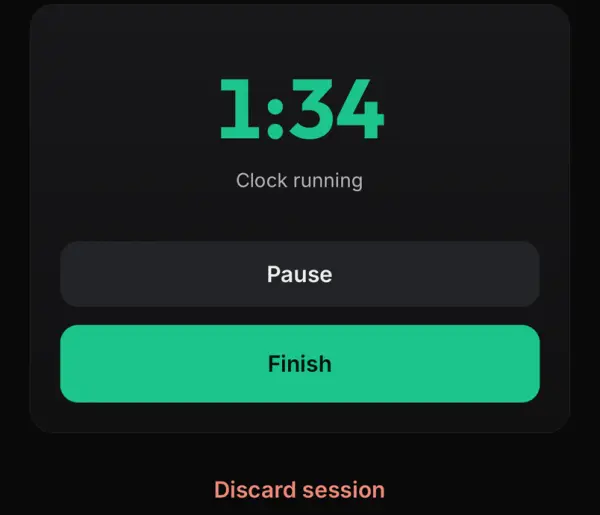
- The clock: Pause stops it and Resume starts it again; paused time does not count. Closing the app loses nothing. You never type minutes: they are the clock’s whole minutes. Under 3 minutes it is not a session, so Finish offers to discard it.
- Finishing: Finish stops the clock and asks how hard it felt, RPE 1 to 10 (1 is barely moving, 10 is everything you had), plus an optional distance and notes. Discard session throws it away and saves nothing.
- Heart rate: wear a watch and it records the session (IronLevel’s Apple Watch or Wear OS app opens when you start). A Bluetooth chest strap works too and wins over the watch when both send; a gym machine’s own reading counts when neither does (see Machines and sensors). With your max heart rate set in Settings › Body, your average heart rate’s zone sets the effort instead of your RPE.
- Verified heart rate: earns a little more. It needs the heart-rate readings to cover nearly the whole session without long gaps, and your max heart rate set. A number typed in never counts.
- Intervals: plan your work and rest rounds and pick the machine, then Start intervals. The phone buzzes and plays a sound at each change, with a countdown buzz before it; a notification marks each change, so it works with the phone locked. A different buzz means your heart rate is outside the target zone. Pause pauses the plan.
- Target zone (cardio): a cardio block in your program can have a target heart-rate zone; built programs give every cardio day and after-lifting block zone 2, the easy pace you could talk through. With a watch or a chest strap on, its timer shows your heart rate against the zone, and the phone and watch buzz and say “above zone” or “below zone” when you drift out. It waits 30 s at the start while your heart rate climbs, then 10 s outside the zone before the first cue, and repeats at most every 20 s, so a short blip never sets it off.
- Changing the zone mid-session: tap the target on the timer and pick another zone. It changes this session only; your program keeps its zone, Go again runs at the zone you picked, and the summary notes the change.
- Time in zone: after the block, the summary and its history show how long you held it, such as “38 of 45 min in zone 2”, from your watch’s heart rate. Run a block again at another zone and each zone gets its own line. Without a watch there is no zone on the timer, only how to keep the pace easy, and no time in zone.
- The bands: each zone is a 10% band of your max heart rate. With only your age set, the max is an estimate and can be off for you by about ten beats, so type a measured max in Settings › Body for an exact band.
- Distance and route: the distance you type at Finish is what can set a distance best. An outdoor run or ride also saves its route, GPS distance and pace in Apple Health.
- Apple Health: Finish saves the session as a workout of its type (a run, a ride, a yoga session) with its heart rate, and your RPE as its effort score. On Android it goes to Health Connect.
- Bluetooth machines: a paired smart bike, treadmill, rower, bike sensor or strap shows its numbers under the clock and saves them with the session (Machines and sensors).
- Lock screen and watch: the clock, or the interval you are on, shows on the lock screen, and the watch shows the elapsed time or the interval with your heart rate.
Example
You tap Start a workout, then Run, and pick Outdoor. Your watch starts recording. You pause at a crossing, so the wait does not count. After 32 minutes on the clock you tap Finish, pick RPE 5 and type 5.2 km. Apple Health gets the run with its route and heart rate.
What to do
Start the clock when you start training and pause it when you stop. Set your max heart rate in Settings › Body and wear your watch, so heart rate sets the effort and a zone 2 ride shows its band (114–133 bpm at a max of 190). Pick the RPE that matches how hard it really felt.
Sources
- Easy zone: The easy zone sits below the first breathing threshold, and the talk test finds it. Foster et al. 2008, J Strength Cond Res
- Max from age: A max heart rate from your age is an estimate, about ten beats off for one person. Tanaka, Monahan & Seals 2001, J Am Coll Cardiol
Read next
- XP from timed sessions
How a run, ride, swim, walk, class or yoga session turns into Work and XP
- Machines and sensors
Bluetooth bikes, treadmills, rowers, bike sensors and heart-rate straps, live while you train
- Your workout on the lock screen
The rest timer and your next set on the lock screen and Dynamic Island
- Apple Watch
Heart rate, logging sets from your wrist, whole workouts without your phone, and complications on your watch face
- Wear OS watches
Heart rate, logging sets and whole workouts on a Wear OS watch, the IronLevel watch face, complications and Tiles
- Importing history, Health and Apple Watch
Bring your past workouts, and connect your watch