The first session of an exercise
The first time you do an exercise, the app has no history to progress from. It looks for the closest thing it knows, and when there is nothing, it starts light and asks you to find your weight.
How it works
- Imported history: if you imported workouts, it starts from your best of the last 3 imported sessions of that exercise, skipping deload weeks.
- A new machine for an exercise you know: it starts from your other history of that exercise, 85% of it, because machines load differently.
- A close cousin: a front squat from your back squat, a leg press from your squat. It takes 80% of your best from the last 3 sessions of the related lift, on purpose on the light side.
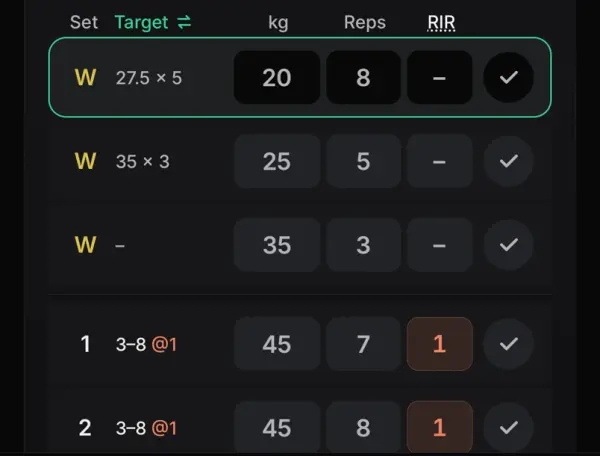
- Nothing to go on: a baseline. The sets start at the empty bar, the machine’s first pin or the lightest dumbbell, and you load up to a working weight. The last set says “Baseline: as many reps as you can with good form”, and those reps set your next weight.
- Ticking a set with its reps box empty logs the reps the box shows, the bottom of a range like 8–15, the same as typing them. The baseline’s last set shows no number, so its tick asks for your reps first.
- A program you built yourself has no baseline set: every set shows your program’s target, and you pick the weight. Your best set and its reps in reserve set your next weight. A set logged without reps in reserve counts at the target.
- During the workout, when a set is 2 or more reps easier or harder than planned, the sets left move to match, at most 10% at a time (Settings › Adjust weights during a workout).
Example
You squat 100 kg for 5 and add the leg press. The app has no leg press history, so it starts from 80% of your squat and plans a few sets; the first set tells it whether to go heavier.
What to do
On a baseline, take a couple of light sets to find a weight you could lift for the range, then give the last set everything with good form. Log what you really did, even if it differs from the plan.
Read next
- Progression
When the weight goes up, holds or comes down
- Importing history, Health and Apple Watch
Bring your past workouts, and connect your watch