Your workout screen
One screen shows a finished workout, both right after you tap Finish and when you open it from History. From the top: the header, your wins, what you earned, your exercises and your note.
How it works
- Header: the date, the workout’s name, Edit and the ⋯ menu (Share, Delete), then one line with the time, sets done of sets planned, the weight you moved and your average reps in reserve.
- Wins: the few things that matter most, best first: new records (estimated max, reps at a weight, a workout’s volume), Feats, skills that went up a level (old level to new), what goes up next time, and an exercise you did for the first time. With none, the card stays away. The first workout of an exercise sets its starting point, so it has no record yet.
- Earned: the XP this workout paid, each skill’s bar, and the materials, Essence and drops you found, each with its picture. Then your weekly board and quests, and your pinned goal.
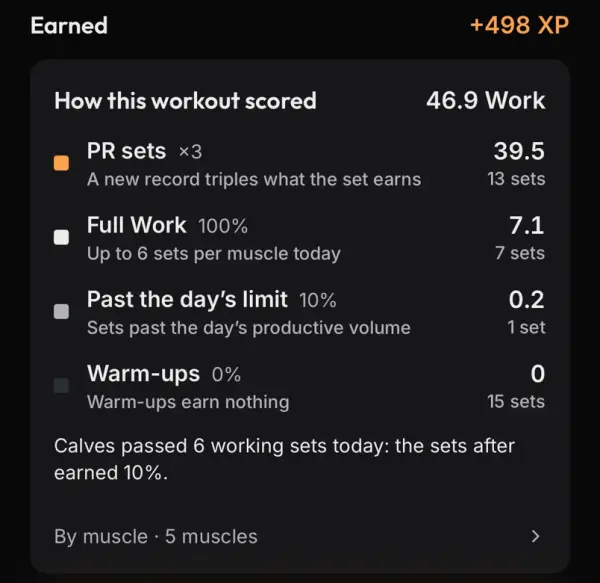
- How it scored: the quiet row at the end of Earned. It opens the Work from every working set, grouped: record sets earn ×3; up to 6 working sets per muscle in a day earn 100%; sets past that earn 10%; warm-ups earn nothing. Under it, the Work of each muscle.
- Exercises: one row each, with its best set, its working sets and weight moved, and a mark when it set a new best or beat last time. Tap a row to see its sets. The small icon opens the exercise’s page.
- Right after Finish your rewards play first, then Done appears. Opened later from History, everything is shown at rest and the button is Do it again.
- After your first workout, the question about training-day reminders comes right under your wins, and the card for your first craft ends Earned with one button that opens it ready to start. On later workouts, any question comes at the end.
- Your phone shows the screen straight away; your final XP lands a moment later and the screen says when it is still on the way. Once it lands, the Predicted note goes, even with the screen still open.
- Edit a past workout from the same screen: its records update.
Example
You log 8 working sets for calves in one workout. The first 6 earn 100% of their Work, the other 2 earn 10%, and How it scored says so: “Calves passed 6 working sets today”. One of your bench sets beat your best, so it earns ×3 Work and an Essence.
What to do
Open “How it scored” after a big day: it shows where your Work went. If a skill paid nothing, its bar is part full and keeps the Work for next time.
Read next
- XP and Work
How a set turns into Work, and Work into XP
- Recovery and the day’s limit
Every set earns full Work, up to 6 per muscle a day
- Materials and your inventory
Where each material comes from, and the Work bar on your summary