Programs
A program is your training week: its days, the exercises on each, and the sets, reps and effort for each exercise. There are three ways to get one, and Choose a plan shows all three the same way from Home, Train’s Plan tab, the Today card, Train’s ⋯ menu (New program) and Getting started’s The Plan step: Ready-made plans (free), Make one for me (Pro) and Build my own. Have a program already? opens a menu to import a spreadsheet or add a code someone shared.
How it works
- Make one for me first asks what you want to train: Lifting, Running or Lifting + cardio. Lifting builds a lifting plan with no cardio step; Lifting + cardio adds the cardio step below; Running builds a running plan from what you run now, toward a race or a fitter base (see Running plans).
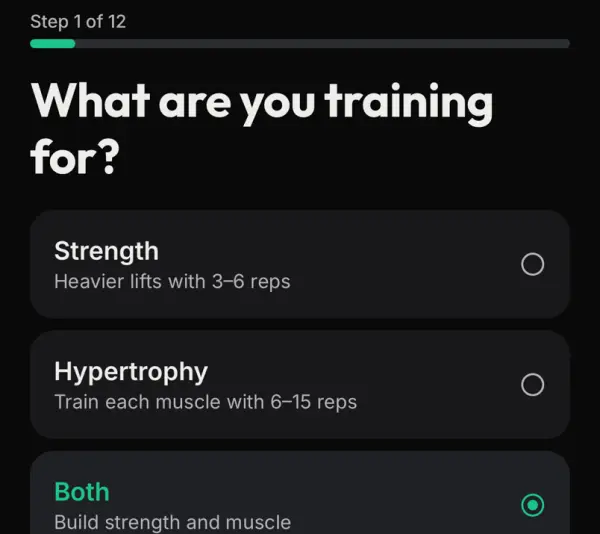
- Make one for me: a step-by-step builder, one question a step (your goal, 2 to 6 days a week, the split, how long you have, your experience, focus, exercises, cardio and your gym), and the app picks the exercises, the sets, reps, effort, rest and warm-ups, and how they progress over the mesocycle.
- Every step starts on a default that suits most people starting out: full-body days, strength and muscle together, the experience you gave when you set up, and your gym. Happy with the rest? Tap Skip to review on any step: the review shows what you get, and Build makes it. Back, or a swipe from the edge, goes to the step before; leaving after you changed something asks first.
- Not sure how many days? Beginners do well on 3 lifting days. Intermediate lifters get 3 for Both and 4 for Strength or Hypertrophy. Advanced lifters get 4. Picking a number of days gives you that many lifting days and nothing else: no cardio is ever added for you.
- Recommended cardio: the cardio step tags 2 cardio days of 60 min as Recommended, on days of their own so they get in the way of your lifts the least. That is 120 min a week, and walks make up the rest of the 150 a week to aim for. With more lifting days it recommends fewer, so you keep at least one rest day (6 training days at most).
- None is just as good a pick: nothing is turned on until you choose it, and a week with no cardio shows nothing about it. Every value can still be changed after. Next time you build, the app starts from your last answers instead.
- Cardio in a built program has two parts, each on or off by itself, so you can have both. Cardio days adds up to 3 days of 20–60 min between your lifting days. Light cardio after lifting puts a 10–20 min block after your last set on some or all of your lifting days. For example: 3 lifting days, 2 cardio days of 45 min and 10 min after each lifting day. Both are off unless you pick them.
- Each part has its own activity: running, a walk or incline walk, a bike, rower, air bike, elliptical, ski erg or stair climber. Each one in the list says what it suits, such as “Spares your legs” for the ski erg or “Best for intervals” for the air bike. Your week shows both, and the minutes line adds them up, such as “2 × 45 + 3 × 10 = 120 min a week”, next to the WHO’s 150–300.
- Next mesocycle: the cardio the app planned is planned again, as you set it up. A block you added to a lifting day yourself stays on that day, unchanged, in every mesocycle after.
- Target zone: a cardio block’s edit sheet has a Target zone row: None, or zone 1 to 5, each with its heart-rate band. Built programs give their cardio zone 2; a program you already have keeps none until you edit it. In the workout, Start runs the block on a timer that watches your heart rate (see Timed sessions).
- A block after lifting is added to your session or fits inside it. Add to my session (the default) keeps all your lifting time, so that day runs your session plus the block and about 2 min to change over. Fit inside my session plans less lifting that day, so the session still ends on time, and a short session gets a shorter block. Programs built before this choice keep fitting it inside.
- Where the cardio goes: always after the lifting, never before it. Leg-heavy cardio (running, the bike, rower, air bike, elliptical, incline walk and stair climber) goes on days that don’t train legs, and its cardio days stay off the day before a leg day where the week allows. A block after lifting the day before a cardio day is fine: it costs no muscle or strength.
- Cardio days are easy: a pace you could talk through. The session length list says how on the machine you picked. On an air bike, pedal steadily with the watts low and flat: the fan only pushes back as hard as you push. On a rower, take easy, long strokes. On a stair climber, keep a slow, steady step rate and hold the rails lightly, only for balance. Each length shows the minutes it makes a week, and says so once it reaches the WHO’s target.
- The program library: 13 ready-made programs, each with its own way of progressing (beginner linear, undulating, waves, couch to 5K and more). You use it as written.
- Walking base, in the library: 5 brisk walks of 35 min a week, 175 min in all, every week until you stop it. No running and no intervals. When you start it, pick your walk: a walk (outdoors or on a flat treadmill) or an incline walk on a treadmill, which is harder at the same speed. Every walk counts toward Walking, and it runs next to your lifting plan.
- Swim base, in the library: 3 swims a week for 8 weeks, building to 30 min of continuous swimming. Week 1 is 10 × 1 min easy with 1 min rest at the wall between. Need longer? Pause the timer. The swims get longer and the rests shorter, and week 5 is lighter so you recover. 2 swims a week works too: the next week starts once you have done this week’s swims, so it just takes longer. Nothing to pick when you start it: every swim counts toward Swimming, and it runs next to your lifting plan.
- Build my own: you pick the days, exercises, sets and reps. The app still moves your weights after each workout. “Plan targets” can then plan the weeks for you on your own exercises, without adding, removing or swapping any.
- Whichever you pick, you can edit it: swap an exercise, change its sets or reps, or move a day.
- One lifting plan and one cardio plan can run at the same time. The running programs (Couch to 5K and the like) and plans of only cardio are cardio plans; everything else, a lift-and-run plan too, is a lifting plan. Starting a plan of the kind already running asks “Replace …?” first; a plan of the other kind runs alongside.
- Training days: on a plan’s page, Days is Automatic (the app spreads its days over your week) or the weekdays you pick. On Automatic, a plan of 2 or 3 days a week always leaves a rest day between workouts: train on a Friday and the next one is Sunday, not Saturday, with what the week has no room for moved to next week. Pick fewer than the plan’s days and the rest move to next week; pick more and the extra days give you room to catch up. A missed day waits for your next picked day.
- Today shows each plan’s workout planned for today, each with its own Start. A plan with nothing planned today still offers its next day there, so you can train either plan any day; it counts as that plan’s next day.
- Stopped a plan and want it back? Its page says “Pick up at …” and carries on from the week and the day after the last one you trained. Start over begins it again from the first week.
- Training reminders (Settings › Notifications, off until you turn them on): a note such as “Upper A today” at the time you pick, on the days your plan has a workout, or on the weekdays you pick when you have no plan. None comes on a day you have already trained, and none ever mentions a day you missed.
Example
You train 3 days a week and want to grow muscle. “Make one for me” with Hypertrophy and 3 days gives a full program with a mesocycle that gets a little harder each week, then a deload. Start Couch to 5K too and both run: your lifting days and your runs share the week.
What to do
Not sure? Let the app build it. Already follow a plan you like? Build your own and use Plan targets for the weeks. Want cardio with the least effect on your lifts? Give it days of its own.
Sources
- Lifting days: Beginners 2–3 days a week, intermediates 3–4, advanced 4–6. Ratamess et al. 2009, Med Sci Sports Exerc (ACSM position stand)
- Twice a week: Training each muscle twice a week beats once. Schoenfeld, Ogborn & Krieger 2016, Sports Med
- Cardio minutes: 150–300 min of moderate activity a week for adults. Bull et al. 2020, Br J Sports Med (WHO guidelines)
- Cardio with lifting: Cardio next to lifting does not cost muscle or maximal strength; it costs a little power, most in the same session. Schumann et al. 2022, Sports Med
- Lifting before cardio: In the same session, lifting first gave more lower-body strength. Murlasits, Kneffel & Thalib 2018, J Sports Sci
- Easy pace: Being able to talk comfortably keeps you below the ventilatory threshold. Foster et al. 2008, J Strength Cond Res
- Stair climbing: Short daily stair-climbing bouts raised aerobic fitness within two months; stair machines are vigorous unless you slow the step rate. Boreham et al. 2005, Br J Sports Med; Ainsworth et al. 2011 (Compendium)
- Building up: Raise the amount of exercise gradually, by time first; sharp jumps from one week to the next raise injury risk. Garber et al. 2011, Med Sci Sports Exerc (ACSM position stand); Gabbett 2016, Br J Sports Med
- Leg-heavy cardio: Running interfered with leg strength and size more than cycling. Wilson et al. 2012, J Strength Cond Res
Read next
- Running plans
A running plan made for you: from what you run now to a race
- Mesocycles and deloads
3 to 6 weeks that get harder, then a lighter week
- Progression
When the weight goes up, holds or comes down